Showing posts with label cold nights. Show all posts

Tuesday, December 23, 2008

It's cold outside....

So this morning was rather eventful...

Jacki woke me up at 4am because she was cold. She had checked the heater and guess what... it was dead. Well sort of dead. Fan was running, gas was working but no spark...
So the house was down to 60 at that time.

She woke me up and started speed talking. Not exactly what my head can handle at that time of day. I mean, I didn't even have my coffee yet...

Anyway as any guy of course I could look at it and by some miracle it would work... well not in this case...

Instead since I just couldn't fall asleep I got up and "sealed" off the living room (it's big and steals all the heat). Then I got the space heater going. Space heater is kind of the official description. It's more portable than it's heating. Anyway I went ahead and lighted candles and turned on the oven.

By 7 or so I ventured off to home depot and got a new ceramic space heater for a larger space that can warm things up a little bit before the heater guy get's there.

Finally driving to work I heard about a water main break on river road (no kidding). It's a 66 Inch water main so that is a ton of water and then some....

Check it out here: http://www.foxnews.com/.

The story so far:
DEVELOPING: Emergency workers on Monday were rescuing drivers trapped by rushing water after a water main break in Maryland.

Cars were stranded after the break at River Road and Fenway Drive in Bethesda, Montgomery County police said.
The county's Swift Water Rescue Team was called to the scene where a river of water of between 3 and 4 feet high trapped multiple vehicles on River Road.

Notice the basket being lowered from a helicopter!!!! no it's not a rescue at sea... It's a water main break!!!! Just kind of weird it had to happen on riverroad...
(btw. People are getting out safely)


Saturday, November 17, 2007

Shooting the Stars

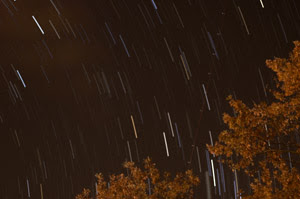
Soo I stumbled across an article with a photo of star trails.

It looks pretty cool so I have been trying to figure out how to do something similar.

I started out with long exposures but with long exposures of several minutes the chance of getting grain unwanted movement and that sort of stuff is far greater than the chance of it turning out the way you want it.

Sooo to get it I figured that I could do multiple shorter exposures and then merge them aftewards. The only issue with this is that you can get some pretty big files and alot of them. This makes the merging slightly difficult and demanding resources your computer may not have. Imagine the task of opening 200 5Mb files. This will take up your memory and use a lot of disk swapping making it painfully slow.

However I found photoshop action that will open one photo at the time and merge it with another ending with several photos being merged into one photo without killing the computer in the process and best of all --- it's automatic.

I did the first test but about 10 minutes into it the clouds came in.... sooo so much for that idea. However I did get about 50 shots without clouds and the result is here:


The photoshop action I used can be found here: http://www.schursastrophotography.com/software/photoshop/startrails.html
Now since I had about 150 photos in total I found another thing to do with them. I was browsing through them and could see the movement of the stars and the clouds coming in. Soo I set off to create an animation for this.
I "just" needed to find the right tool for it.... Easier said than done...
Anyway for now I ended up with a trial version of Adobe flash which you can use free for 30 days.
Then of course I had to learn how to as easy as possible load up 150 photos and "spit" out an animation.
To help with this I found a small video that did the trick. You can find that here: http://www.learnflash.com/creating-slideshows.html
You can see the animation here: Stars in action
All shots was done as 15 second exposure at f/2.0. I started out with the time period I figured would give the best image and the optimized the aperture after that.